
Before You Begin:
-
Ensure you’ve downloaded the SkillGrader app. If not, please refer to our Downloading the App guide for step-by-step instructions.
-
Check your email for the configuration details we sent you. These include:
-
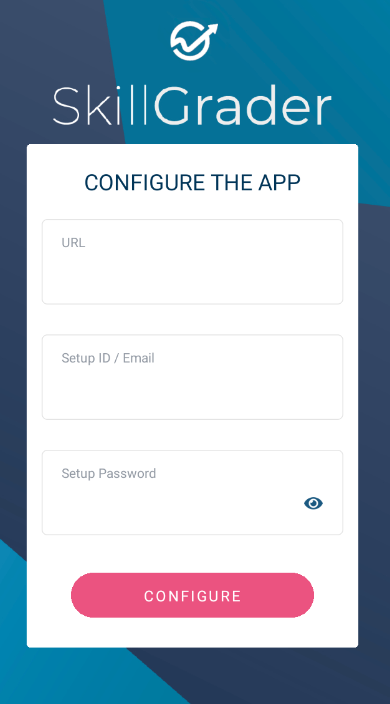
URL
-
Setup ID
-
Setup Password
-
Note: Configuration details are only required when setting up the app for the first time on a new device. They are separate from your login credentials.
Steps to Configure the App
-
Open the SkillGrader App
-
Find the app on your device and tap to open it.
-
-
Start Setup
-
Tap on Begin to initiate the setup process.
-
-
Enter Your Configuration Details
-
Input the details provided in the email you received:
-
-
Select Industry and Department
-
Choose your industry and department from the dropdown menus.
-
-
Finalize Setup
-
Tap Set Up the App to complete the configuration.
-
Next Steps
After completing the setup, log in using your personal credentials. For assistance, refer to our Logging In guide.
If you have any questions or encounter issues during setup, please contact our support team. We’re here to help!